PartyPlanner64 - Mario Party Board Editor

Today I fixed some issues with layouts that quickly split and join paths, like this one:

KMk3ko5.png


Another issue is that not placing enough Boos/Bowsers/Koopas leaves them in a big pile on the start space right now. I need to either patch the drawing routine or just put them off screen.

5jwP4AE.png
 
Out of curiosity, why did you make the video's private? Is there something wrong with it, or did you not want to make people too excited for something that won't be released for a while?(as you said you wanted to release the editor in a few weeks, but some people can be... impatient, to say the least :p )
 
The Shattered Legacy said:
out of interest does defining the Boos/Bowsers/Koopas outside of the board circuit cause errors or not?
I haven't looked much at the Mini-Game Island maps, although they are defined the same way as regular boards. The limitations for all boards are at least going to start out the same as what the original limitations are (so for DK: 1 Bowser, 2 Boos, 1 Koopa). There is opportunity to expand on that a bit probably, but if a character isn't present at all then it will be a lot more difficult.

The Shattered Legacy said:
On a tangent here, but would it be possible to have a pseudo Bowser turn with MP2 as if every turn a Bowser Bomb was in play (but didn't occupy the inventories of anyone)?
Sure it's possible:
[list type=decimal]
[*]Find the place where item information is stored. (Probably already around the net in GS codes.)
[*]Breakpoint in memory and wait for the game to try to read a bowser bomb.
[*]Patch that routine to always do the bowser bomb logic regardless of the item.
[/list]
This wouldn't really have a place in a general purpose editor, but it could be a fun mod.
 
Here's maybe an update for anyone who didn't catch the videos, and a request for some creative input as I finish up the very few functional changes I want to make before an initial release.

First, here's screenshots from the main two views in PP64:


http://i.imgur.com/27vmytN.png


http://i.imgur.com/aCyJ3UG.png

The problem is I'm terrible at drawing, so I have no good default graphics! I would like for there to be a set of default board assets that are generic enough so that someone could only place spaces and not have a terrible experience on a boring black background.

This wiki page goes over the details of the assets that you can see in the screenshots (dimensions, etc.). The original board graphics could also be of interest.

My thoughts for the main background have been to have some sort of a grid. It would also be nice if the perspective of the image was similar to the originals and helped to illustrate how the perspective should be drawn.

For the scene backgrounds, it would be nice to just have them match the theme of the main board background.

The 4 bottom character graphics in the Toolbox have also been troubling. I don't want to have the likenesses of these characters present in the UI, but I still want the features to be understandable. (That's kind of what I was going for with the Boo for example.) These are 42x42 (doesn't really matter though, not a game asset).

I'd appreciate any help with the graphics. Release will come a lot faster if someone can really knock these out of the park ;)
 
smashbro29 said:
You're the champ for doing this and the ultra champ for making sure the editor spits out files that are usable on actual N64s.

I made an account just for that.

Agreed. While I can't be of much help on the art side, I have spread the word to hopefully speed up the process of finding an artist who would be able to help you.

Either way, keep up the good work. I've been hoping that something like this would exist for the past five or six years.
 
I retweeted your request on the MPL Twitter, so hopefully that caught the attention of some artists.

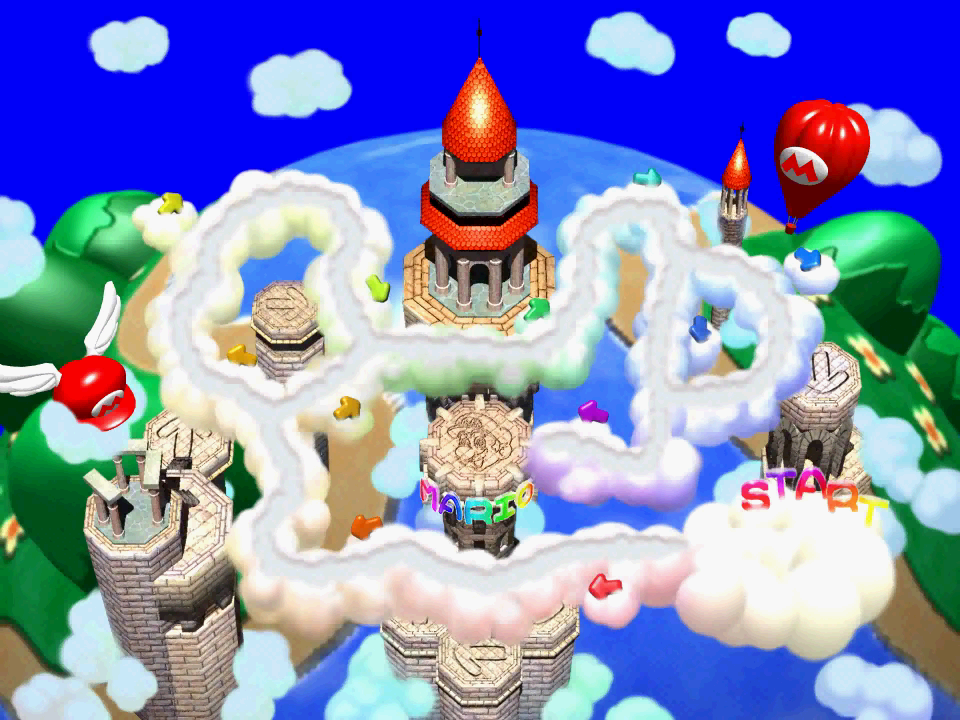
The board itself should be a single 960 x 720 image.

This, along with the background scenes, is good info. You don't have to wait for the editor to be released in order to get started on creating your board. Anyone can work on that now!

Example image for those that are too lazy to follow PP's link:

MarioParty-Mario'sRainbowCastle%28Unmarked%29.png
 
Hey I am new to this forum and this tool is truly amazing. I was wondering if you knew if hacks made by party planner worked on actual hardware through an EverDrive 64 or a 64 drive. Lots of hacks are made only for emulator and don't work on console. I would be happy to test it on my EverDrive 64 to see if it works on console. If you would want to you can pm me a patch or a rom or an early build of the program so I can test if its compatible.

Also I made a grid like board for a graphic you could use as a default template for your tool.
vfTRMrU.png
 
Luke said:
Hey I am new to this forum and this tool is truly amazing. I was wondering if you knew if hacks made by party planner worked on actual hardware through an EverDrive 64 or a 64 drive. Lots of hacks are made only for emulator and don't work on console. I would be happy to test it on my EverDrive 64 to see if it works on console. If you would want to you can pm me a patch or a rom or an early build of the program so I can test if its compatible.

Also I made a grid like board for a graphic you could use as a default template for your tool.

I do some testing on 64drive and I would assume it would also work on EverDrive 64. An expansion pak will also be required for the time being.

That graphic could be an interesting template for others if they like the Rainbow Castle theme, but I'm looking to have something much more generic so there is no theme imposed.
 
Here's something a little exciting. I wrote my first successful (non-crashing) space layout to Mario Party 2 today!

arO7Q23.png


It will be awhile before writing to MP2 is stable. The board images are larger (1152x864) but the camera is weird so everything is very zoomed. It will be awhile before I can adapt the trick to overwrite the background and figure out all the custom event code to make it usable.
 
Back
Top